Tier Group Pricing
In some industries, part attributes can affect the part price. For example, parts used in heavy construction equipment, like excavators, vary greatly in weight and the weight may affect the price. Another example is when a part is offered in different finishes, such as unfinished, chrome, brushed, or gold, and the finish may affect the price.
Tier Group Pricing is a feature that calculates an attribute-based pricing strategy, where a product is offered at different price points based on Tier Groups. This strategy provides a powerful alternative or supplement to cost-based, market adaptive-based, and regular group alignment-based pricing strategies. It also eliminates the need or reduces the dependency on assessing and setting accurate cost values prior to setting new price values.
You can use Tier Group Pricing to:
• Set new prices for new parts
• Align prices of groups of parts
• Analyze and compare price data by physical attributes
• Optimize new prices based on common part physical attributes
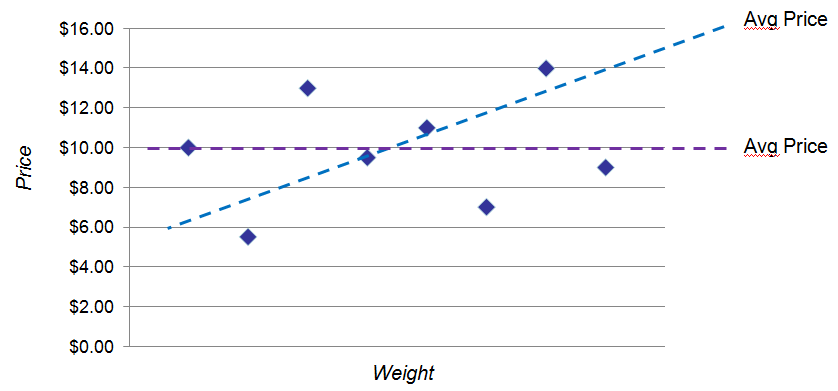
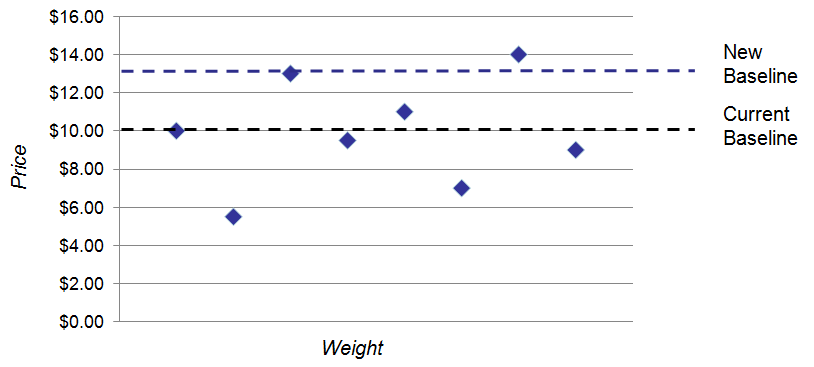
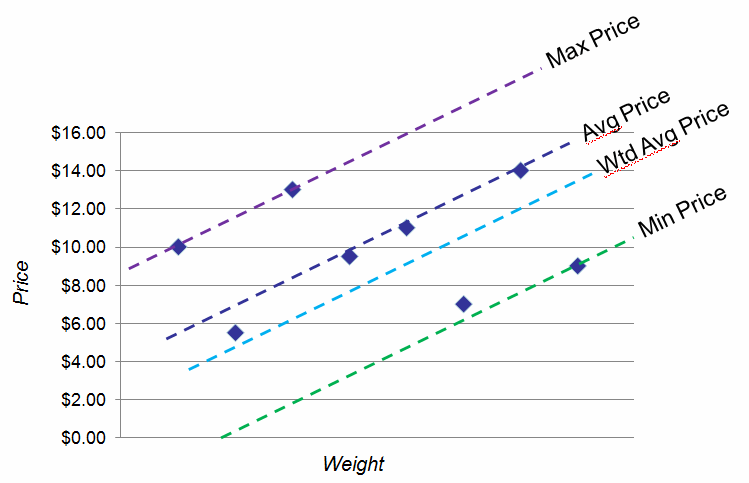
The general concept of Tier Group Pricing, uses a baseline as an established price reference that can be used to compare current part prices or calculate new part prices. A baseline may have a slope = 0, or a baseline may have a slope > 0.
• The Current Baseline is the baseline before the Pricing Policy simulation is run.
• The New Baseline is the baseline after the Pricing Policy simulation is run.
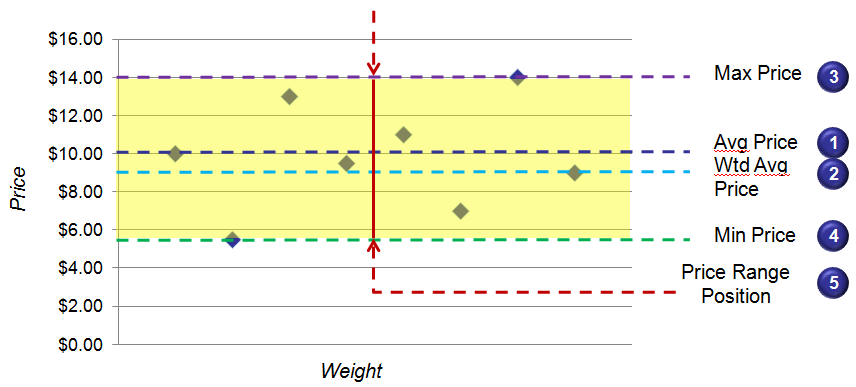
When a Tier Group is defined, you can select from five methods for how to calculate the baseline:
• Average Price
• Weighted Average Price
• Maximum Price
• Minimum Price
• Price Range Position
There are two types of part attributes, and two types of pricing relationships that are supported by the Tier Group Pricing feature:
|
Attribute Type
|
Description
|
Relationship Type
|
|---|---|---|
|
Quantitative
|
These are measurable numeric part attributes. For example:
• length
• weight
• diameter
• volume
Typically, as these attributes increase in measurement, the part price should also increase at a certain rate or slope.
|
Ramp—A sloped line defined by the baseline price point and slope that represents the relationship between the increasing part physical attribute value and the corresponding price for a group of parts. As the physical attribute increases, the price increases at a certain rate or slope.
Each Tier Group can have one ramp.
|
|
Qualitative
|
These are non-measurable part attributes. For example:
• material finish, such as brushed or chrome
• manufacturing type, such as new or remanufactured
• quality grade level, such as grade A or grade B
|
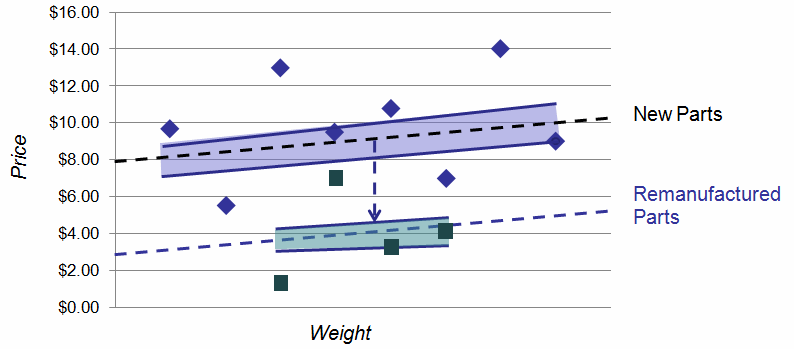
Step—A vertical jump or offset that can be in the up or down direction. Each step is a percentage difference in price from the baseline price point.
|
View Examples of Ramp vs Step Relationships
Assume a part is priced based on its length. In Servigistics, you can create a ramp that describes how to set a price based on weight, like a 10% slope.
The following graph displays a ramp where the Price Slope is the linear relationship between price and weight. As weight increases, price increases linearly.
Assume a part is priced based on whether it is new or remanufactured. In Servigistics, you can create a step that describes how to set prices based on the condition of the part.
The following graph displays a step where Remanufactured Parts are priced at a -60% offset from New Parts.
See Also