Tier Group Pricing Examples
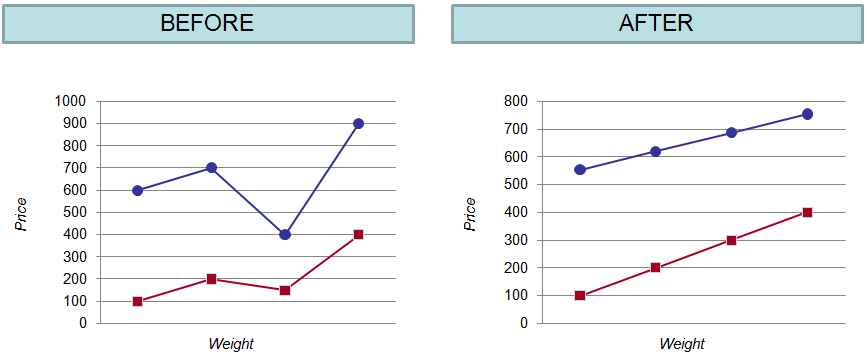
The following diagram shows the effect of Tier Group price alignment. Notice how the Before scenario shows the tier group parts at different prices, but the After scenario shows the part prices in the tier group aligned according to tier group rules.
Tier Group Pricing Example Using the Tier Group OTF Process
 | In this example, assume Ramp Target Slope = 0. |
1. On the New/Edit Tier Group page - Definition tab, the user can select one of the following options for the Baseline Price Calculation SKU Input Option field:
◦ Use all SKUs as input: When selected, the baseline price calculation includes all tier group SKUs.
◦ Limit input to those SKUs assigned to the baseline: When selected, the baseline price calculation limits the input SKUs to only those that are assigned to the baseline (step levels (0)) AND where Current Price > 0.
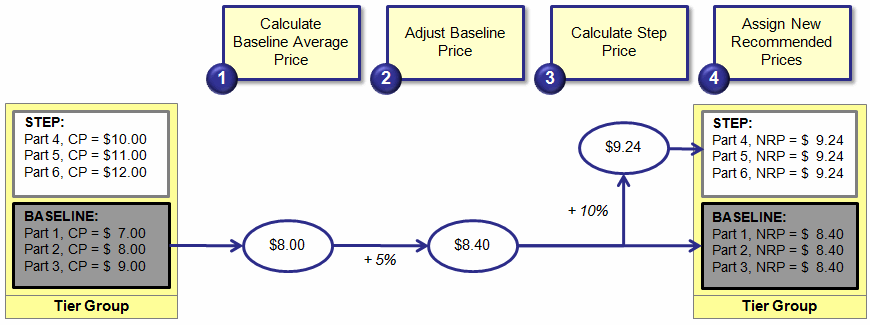
In this example, assume that the user selected Limit input to those SKUs assigned to the baseline for the tier group. Therefore, the Baseline Average Price is calculated by taking the average of the prices for parts assigned to the baseline step (the step with 0% uplift). So, Baseline Average Price = ($7.00 + $8.00 + $9.00) / 3) = $8.00.
(If Use all SKUs as input had been chosen, then Parts 1-6 would have been input SKUs for the Baseline Price Calculation.)
2. The Baseline Average Price is adjusted by 5% for an adjusted Baseline Price of $8.00 + ($8.00 * 5%) = $8.40.
3. The Step Price is calculated by uplifting the adjusted Baseline Price by 10%: $8.40 + ($8.40 * 10%) = $9.24.
4. New Recommended Prices are assigned. The parts in the baseline step are assigned the adjusted Baseline Price ($8.40) and the parts in the step are assigned the Step Price ($9.24).
Tier Group Pricing Example in a Pricing Policy without Price Banding
| | In this example, assume Ramp Target Slope = 0. |
Tier Group Defined:
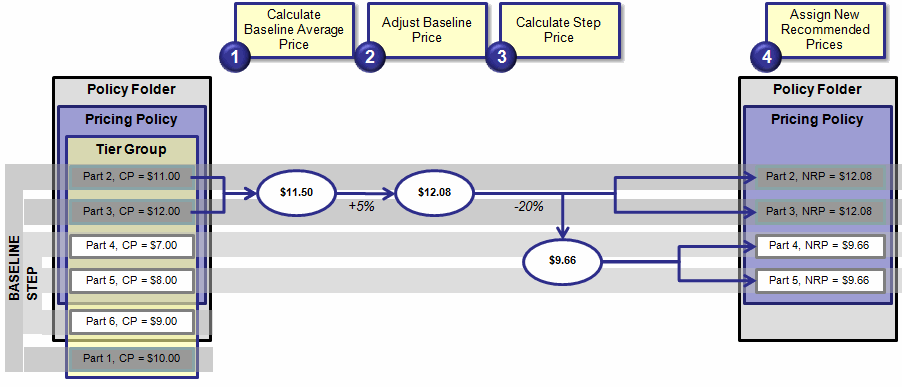
The tier group's baseline step includes Part 1, Part 2, and Part 3. The tier group's step includes Part 4, Part 5, and Part 6. Although Part 1 is included in the tier group, it is not included in the pricing folder or pricing policy, and therefore, it is excluded from pricing policy processing. Also, although Part 6 is included in the tier group and the policy folder, it is not included in the pricing policy, and therefore, it is also excluded from pricing policy processing.
Tier group parts included in the policy folder but not in the pricing policy are input SKU candidates for the Baseline Price Calculation. However, New Recommended Prices are only calculated for SKUs in the pricing policy.
1. On the New/Edit Tier Group page - Definition tab, the user can select one of the following options for the Baseline Price Calculation SKU Input Options field:
◦ Use all SKUs as input: When selected, the baseline price calculation includes all tier group SKUs.
◦ Limit input to those SKUs assigned to the baseline: When selected, the baseline price calculation limits the input SKUs to only those that are assigned to the baseline (step levels (0)) AND where Current Price > 0.
In this example, assume that the user selected Limit input to those SKUs assigned to the baseline for the tier group. Therefore, the Baseline Average Price is calculated by taking the average of the prices for parts assigned to the baseline step (the step with 0% uplift). So, Baseline Average Price = ($11.00 + $12.00) / 2) = $11.50.
(If Use all SKUs as input had been chosen, then all the tier group parts included in the policy folder would have been inputs for Baseline Price Calculation. This means that Parts 2-6 would have been input SKUs for the Baseline Price Calculation.)
2. The Baseline Average Price is adjusted by 5% for an adjusted Baseline Price of $11.50 + ($11.50 x 5%) = $12.08.
3. The Step Price is calculated by adjusting the Baseline Price by -20%: $12.08 - ($12.08 * 20%) = $9.66.
4. New Recommended Prices are assigned. The parts in the baseline step are assigned the adjusted Baseline Price ($12.08) and the parts in the step are assigned the calculated Step Price ($9.66).
Tier Group Pricing Example in a Pricing Policy with Price Banding
| | In this example, assume Ramp Target Slope = 0. |
Tier Group Defined:
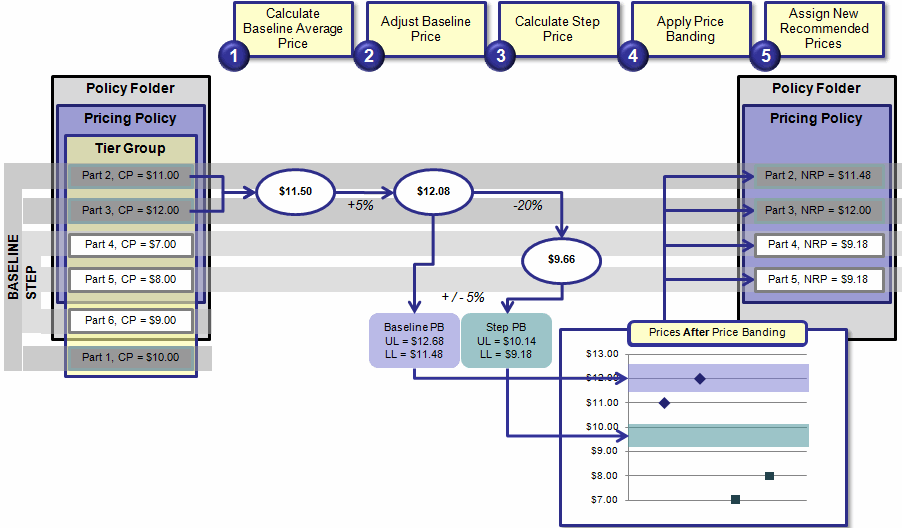
The tier group's baseline step includes Part 1, Part 2, and Part 3. The tier group's step includes Part 4, Part 5, and Part 6. Although Part 1 is included in the tier group, it is not included in the pricing folder or pricing policy, and therefore, it is excluded from pricing policy processing. Also, although Part 6 is included in the tier group and the policy folder, it is not included in the pricing policy, and therefore, it is also excluded from pricing policy processing.
Tier group parts included in the policy folder but not in the pricing policy are input SKU candidates for the Baseline Price Calculation. However, New Recommended Prices are only calculated for SKUs in the pricing policy.
1. On the New/Edit Tier Group page - Definition tab, the user can select one of the following options for the Baseline Price Calculation SKU Input Options field:
◦ Use all SKUs as input: When selected, the baseline price calculation includes all tier group SKUs.
◦ Limit input to those SKUs assigned to the baseline: When selected, the baseline price calculation limits the input SKUs to only those that are assigned to the baseline (step levels (0)) AND where Current Price > 0.
In this example, assume that the user selected Limit input to those SKUs assigned to the baseline for the tier group. Therefore, the Baseline Average Price is calculated by taking the average of the prices for parts assigned to the baseline step (the step with 0% uplift). So, Baseline Average Price = ($11.00 + $12.00) / 2) = $11.50.
(If Use all SKUs as input had been chosen, then all the tier group parts included in the policy folder would have been inputs for Baseline Price Calculation. This means that Parts 2-6 would have been input SKUs for the Baseline Price Calculation.)
2. The Baseline Average Price is adjusted by 5% for an adjusted Baseline Price of $11.50 + ($11.50 x 5%) = $12.08.
3. The Step Price is calculated by adjusting the Baseline Price by -20%: $12.08 - ($12.08 * 20%) = $9.66.
4. Price banding is applied.
The pre-price band prices are the prices after the main pricing policy rule is applied (although, in this case, there was no main pricing policy rule).
Two sets of price bands are calculated - one for the Baseline Step and one for the Step.
◦ The price band for the Baseline Step is +/- 5% of the adjusted Baseline Price of $12.08. This means that the upper limit of the price band is $12.08 + ($12.08 * 5%) = $12.68, and the lower limit is $12.08 - ($12.08 * 5%) = $11.48.
◦ The price band for the Step is +/- 5% of the calculated Step Price of $9.66. This means that the upper limit of the price band is $9.66 + ($9.66 * 5%) = $10.14, and the lower limit is $9.66 - ($9.66 x 5%) = $9.18.
Post-price band prices are calculated as follows:
For the Baseline Step price band:
◦ The pre-price band price for Part 2 = $11.00. This price falls below the lower limit of the price band, so the post-price band price is set at the lower limit price of $11.48.
◦ The pre-price band price for Part 3 = $12.00. This price falls within the price band, so the post-price band price remains $12.00.
For the Step price band:
◦ The pre-price band price for Part 4 = $7.00. This price falls below the lower limit of the price band, so the post-price band price is set at the lower limit price of $9.18.
◦ The pre-price band price for Part 5 = $8.00. This price falls below the lower limit of the price band, so the post-price band price is set at the lower limit price of $9.18.
5. The new recommended prices are assigned as the post-price band prices.