Price Curve Rules
Price Curve Rules adjust prices based on Price Curve Pricing.
Price Cure Rule Components
 |
A star (  ) next to the field on the page indicates that the field is required. ) next to the field on the page indicates that the field is required. |
|
Field
|
Description
|
|---|---|
|
Rule Name
|
The name of the rule.
|
|
Baseline Adjustment % / Baseline Adjustment Amount
|
The Baseline Adjustment % and Baseline Adjustment Amount fields define an amount that is added to the baseline calculation. The Baseline Adjustment % field defines an additional percentage amount and the Baseline Adjustment Amount field defines an additional monetary amount.
For example, if:
The baseline calculation is $50,
Baseline Adjustment % value is +5%, and
Baseline Adjustment Amount value is $10
Then, the rule's baseline value becomes $50 + (5% * $50) + $10 = $62.50.
Enter a percentage amount in the Baseline Adjustment field and/or a monetary amount in the Baseline Adjustment Amount field.
Lower Limit / Upper Limit
Enter a Lower Limit and/or Upper Limit percentage to define a price band (or price tolerance zone) around each group member's theoretical new price.
Click here for more information about price banding
|
|
Active
|
Select Active if you want the Price Curve rule to be available to use in pricing policies.
|
|
Strategy Codes
|
In the Strategy Codes section, you select the strategy codes for the rule. Parts/SKUs are assigned to a strategy code when they are set up, and rules only test parts with the same assigned strategy code. This means that if a part is assigned to strategy code 3, a rule set up for strategy code 1 will not test this part.
Use the left/right arrows to add columns to or remove columns from the Selected box.
|
|
Filters
|
[Optional] In the Filters section, apply filters to the rule
|
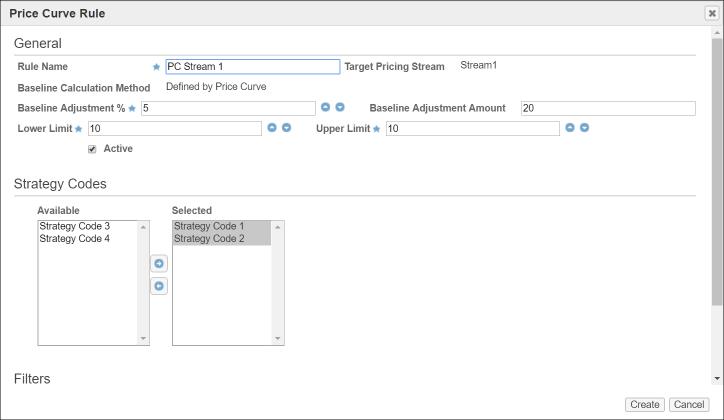
Price Curve Rule Example
The following is an example of a Price Curve rule. In this example, the Price Curve price is raised by 5% and then by $20. Then, a price band of +/- 10% is applied to the Price Curve price. The new Price Curve price is applied to all parts in strategy codes 1-2.