Servigistics AI Assistant
Servigistics AI Assistant is an intelligent companion for Global Planners, Inventory Analysts, and Service Executives that uses Servigistics expert knowledge base and service supply chain context. It explains planning decisions, guides users through workflows, identifies root causes, recommends corrective actions, flags configuration issues and enables natural language questions and answers for faster, smarter decisions.
Types of Servigistics AI Assistants
When you click on the toolbar of a page, the Servigistics AI Assistant pop-up window is opened.
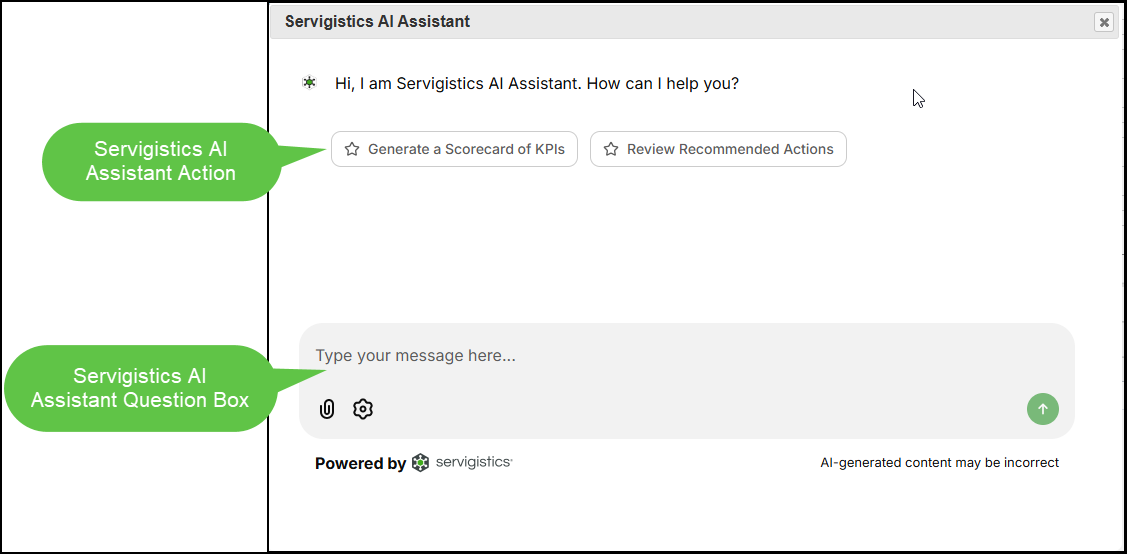
The data that is relevant to the page is loaded into the memory and up to three types of Servigistics AI Assistants are included in the pop-up window:
These are pre-generated, rule-based insights on the Interactive Planner Worksheet page that are displayed on the Servigistics AI Assistant pop-up window. The rules for generating the content is pre-defined, and the results are automatically displayed when the data is relevant and available.
Actions
These are context-aware guided prompts that are displayed as buttons on the Servigistics AI Assistant pop-up window. The buttons are pre-defined requests that are managed on the AI Assistant Actions page. You click an action button and the Servigistics AI Assistant generates the response based on the definition of the action.
Questions
These are user-entered questions on the Servigistics AI Assistant pop-up window. You enter your question or request and the Servigistics AI Assistant generates a response that is relevant to what was entered in the chat box using LLM-based explanations and guidelines.
Best Practices
To get the most benefit from Servigistics AI Assistant:
• Ensure that all toolbar selections and filters are set and the page has fully loaded before clicking .
• Use the available Servigistics AI Assistant Actions on the Servigistics AI Assistant pop-up window instead of entering text in the question box to receive more accurate and consistent responses.
• Ask specific questions on the Servigistics AI Assistant pop-up window that are related to the data loaded on the page. Include details such as the Part and Location to frame the question around the specific content on the page. For example, “Why is the ROP equal to 1 for Part A1C at Location West Wing?”.
• Ask general questions or feature related questions on the Servigistics AI Assistant page. For example, “What is Future Balancing?” or “What is Group Pricing?”.
• Use the available five-star rating system to rate the response received.
• Do NOT close the Servigistics AI Assistant pop-up window mid-conversation. Instead, click on the toolbar to minimize the pop-up window.
Start Servigistics AI Assistant
The Servigistics AI Assistant can be initiated by taking one of the following actions:
For Specific Page Related Assistance
Click on the toolbar of a page that has Servigistics AI Assistant implemented to open the Servigistics AI Assistant pop-up window.
For General Assistance
Enter Servigistics AI Assistant in the Go to box and select the page from the resulting list of matches.